Know what's on your network. Including the devices nobody gave you a login for.
Open-AudIT 7 finds the devices you didn't know about, audits the ones you manage, uses AI to match their software to known vulnerabilities and checks them against ISO 27001 and the DISA STIGs.
Enterprise · free for your first 30 days. The full product and unlimited devices from day one. When the trial ends, Free keeps working on up to 100 devices.
You have a working inventory before anyone hands over a password. The devices nobody gave you a login for, from the PLC on the production line to the controller inside a server, show up on the first scan, with the evidence for each identification kept in the log.
Credentialed auditEvery edition
Add credentials and the inventory fills in: hardware down to disks and memory, every installed package and service, every network card, address and open port. Windows, Linux, Unix and network gear are all covered.
Inventory and change detectionEvery edition
Each audit is compared with the last, so a new disk, a removed package or an unexpected service is recorded as a change rather than lost in a snapshot. Export the lot as CSV, XML or JSON.
Network and application mappingEnterprise
Before a change window, see what a switch, server or database actually carries. The network is drawn from the router to the device on each port, and each application is modelled as its real servers and databases, so "which applications does this server carry?" has an answer.
Benchmarking against published standardsEnterprise
Find out whether a server is configured the way your auditor expects before the audit does. Linux is checked against CIS, DISA STIG, NIST 800-171 and the Essential Eight, and Windows and Active Directory against the DISA STIGs. Each rule is graded by severity and marked pass or fail.
Directories and peopleEnterprise
The accounts auditors ask about are flagged for you: not logged on for 30 days, passwords set never to expire, privileged groups that changed this week. Every directory user is linked to the devices they use, and the directory itself is benchmarked against the DISA STIGs.
353 device types classified, up from 98
1,304 compliance controls across five standards
30 days of full Enterprise, unlimited devices
One open port, one reply, one record
Version 7 is built around discovery. Every identification comes from what the device itself said, and Open-AudIT keeps what it said. Step through how one helper reads one port.
1. Scan: Open-AudIT scans the target address. 2. Port check: A helper only runs when its port is open, so nothing is probed speculatively. A network of Windows machines never sees a PLC probe. 3. Helper: The matching helper speaks the device's own protocol and identifies it from the reply. 4. Evidence: The full parsed response is kept as JSON, so the evidence for every identification is one click away.
Open-AudIT 7.0.1·Discoveries
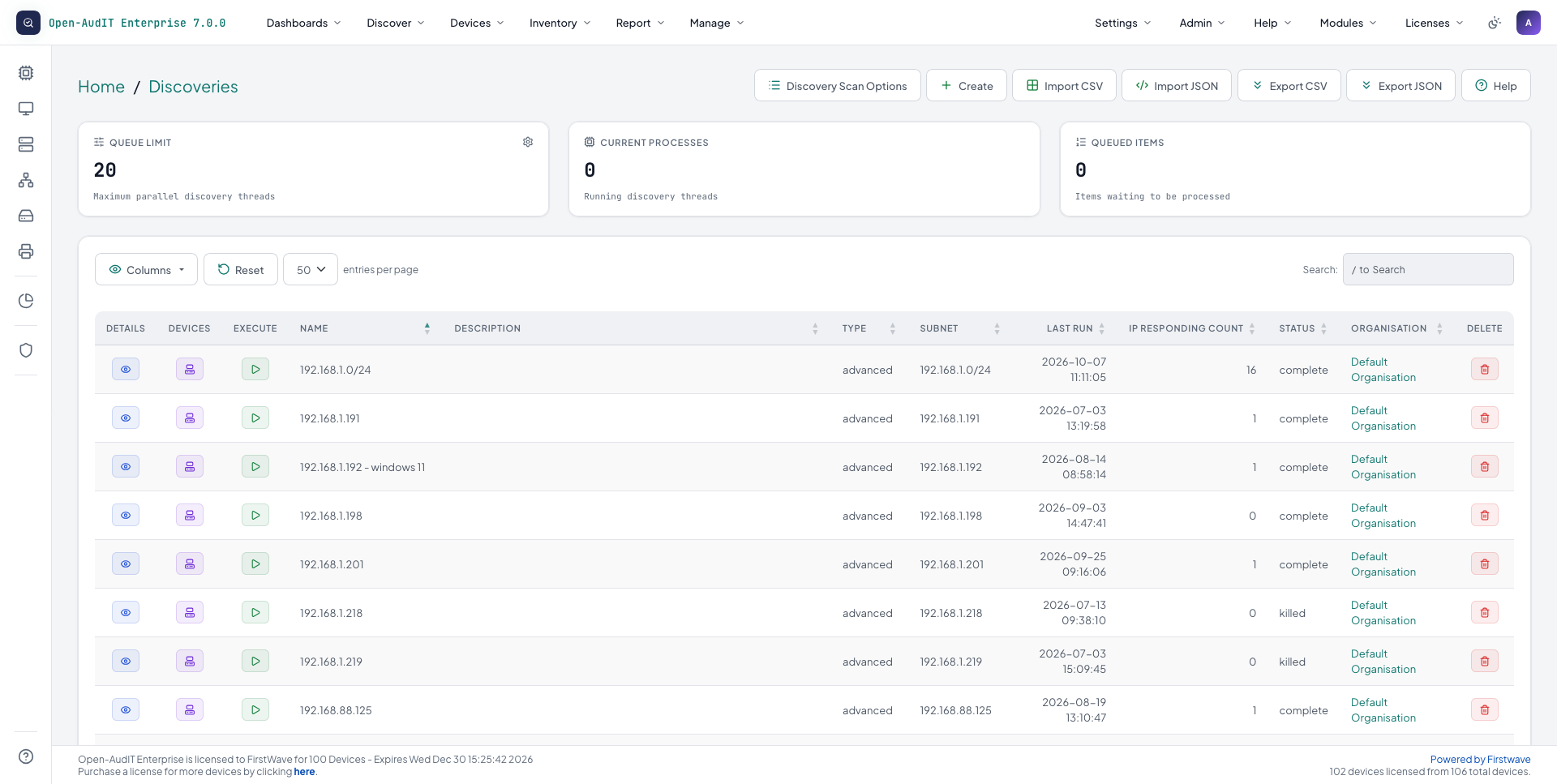
Every discovery with its subnet, last run, responding IP count and status, under the discovery queue.
It reaches further than the scan
If it is connected to the network and uses TCP/IP, something has to know it is there.
Subnet splitting
Large ranges are split into smaller subnets and scanned in parallel.
Expanded port coverage
The port list has grown across both TCP and UDP.
ARP discovery
The server's own ARP table is read, and every in-range address in an audited switch, router or computer is queued for its own scan.
Directory targets Enterprise
Active Directory networks and locations can be used as discovery targets.
Collectors on Windows Enterprise
Collectors now run on Windows as well.
The credentialed audit is all still here
Credential-free identification tells you what a device is. A credentialed audit reads what is on it, and its switch and router tables feed ARP discovery and the network map.
Credentialed audit methods carried forward from Version 6
Method
Reaches
SNMP
switches, routers, printers and UPS
SSH
Linux, Unix and network devices
WinRM, winexe / psexec, WMI, SSH
Windows
Then it draws the picture
On Enterprise, what discovery found becomes the network drawn as it is, applications modelled from their real components, and your directory on one screen.
Network Dependency Mapping Enterprise
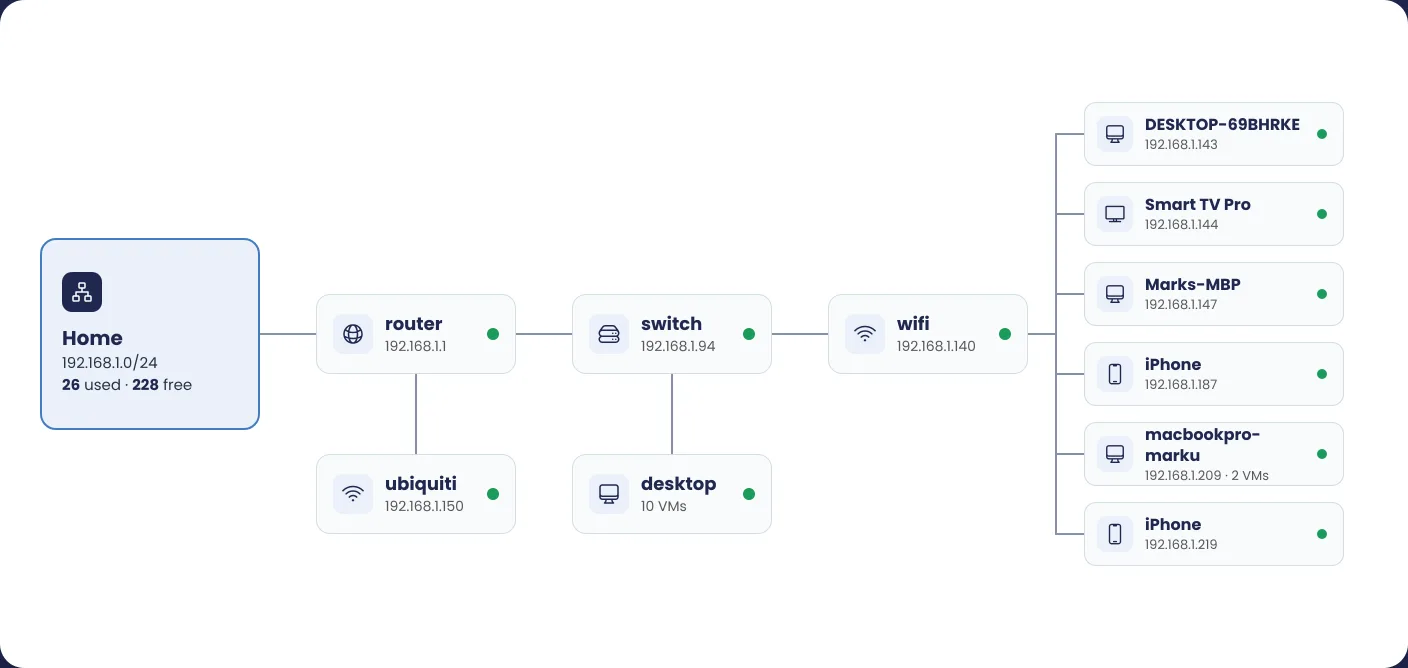
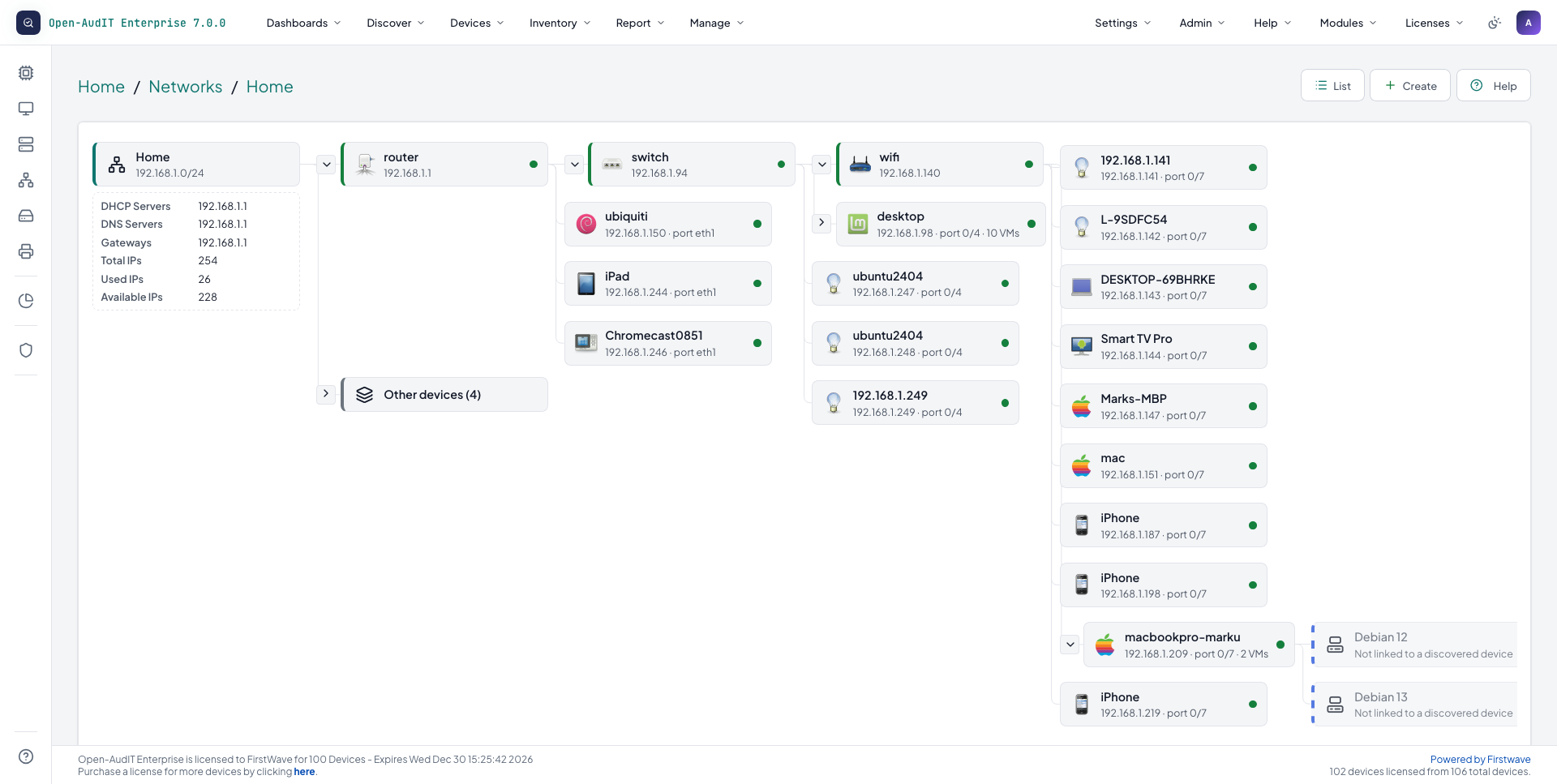
Pick a subnet and see the whole chain, router to switch to wifi to every device.
Each device on the map shows its name, address, connected port and status, with the network's DHCP, DNS, gateway and IP counts alongside.
The map is built from what discovery and your credentialed audits of the network gear learned, so the more completely your switches are audited, the truer the drawing.
Open-AudIT 7.0.1·Networks
One subnet drawn router to switch to wifi to every device, each with its address and port, beside the network's DHCP, DNS, gateway and IP counts.
Application Relationship Mapping Enterprise
Model an application as its real, discovered components.
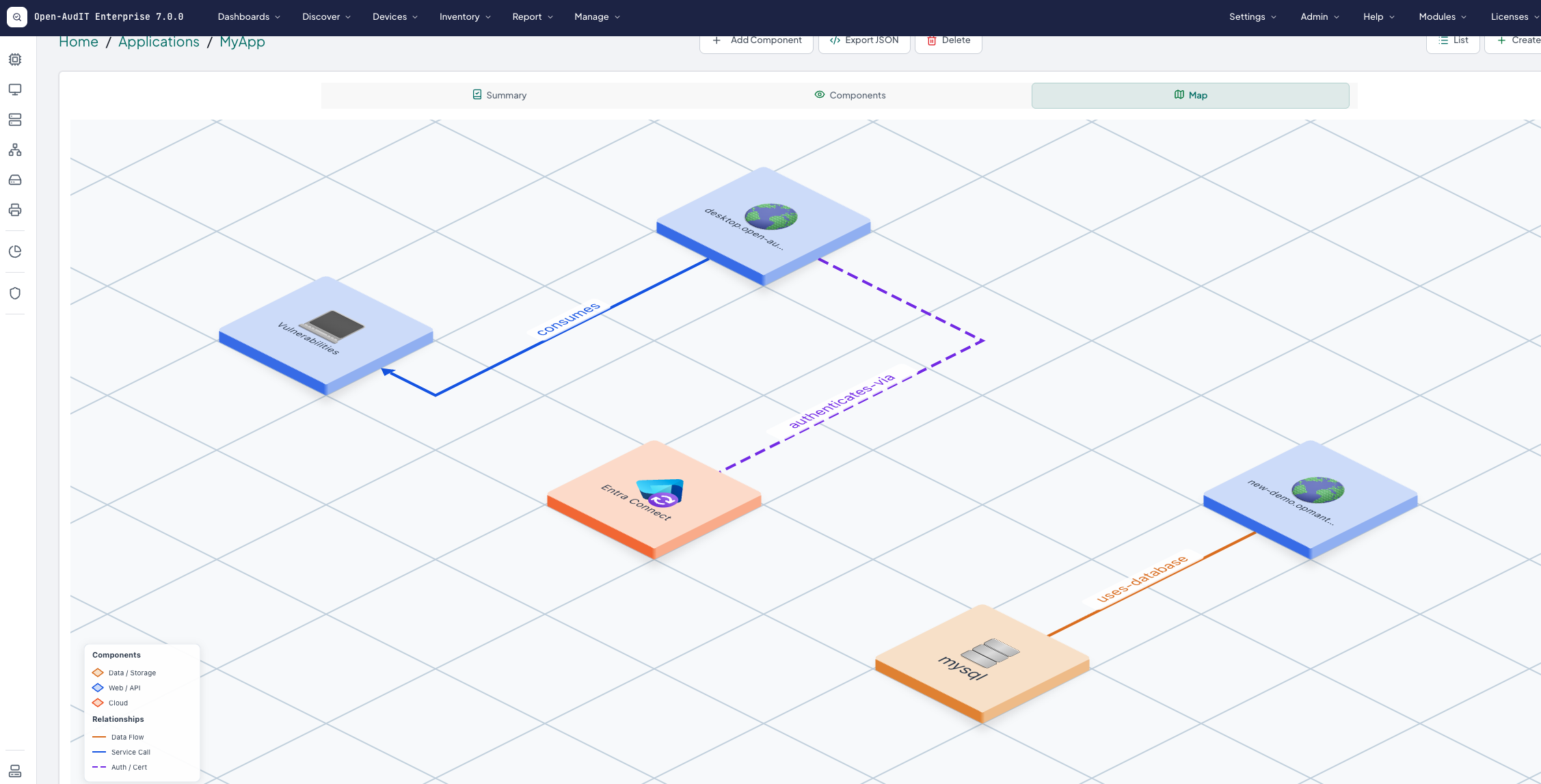
An application is never just one server. Model each one as its components. That means the website, the API behind it, the database it reads and the cloud services it sits on. Each relationship gets a plain name, such as runs-on, uses-database or uses-certificate.
Open-AudIT only offers discovered, available servers and their related databases, so there is no free-text guesswork. A search across every component answers "which applications does this server carry?" before the change window.
Open-AudIT 7.0.1·Applications
An application mapped as its components, each relationship named: consumes, authenticates-via, uses-database.
Directories Enterprise
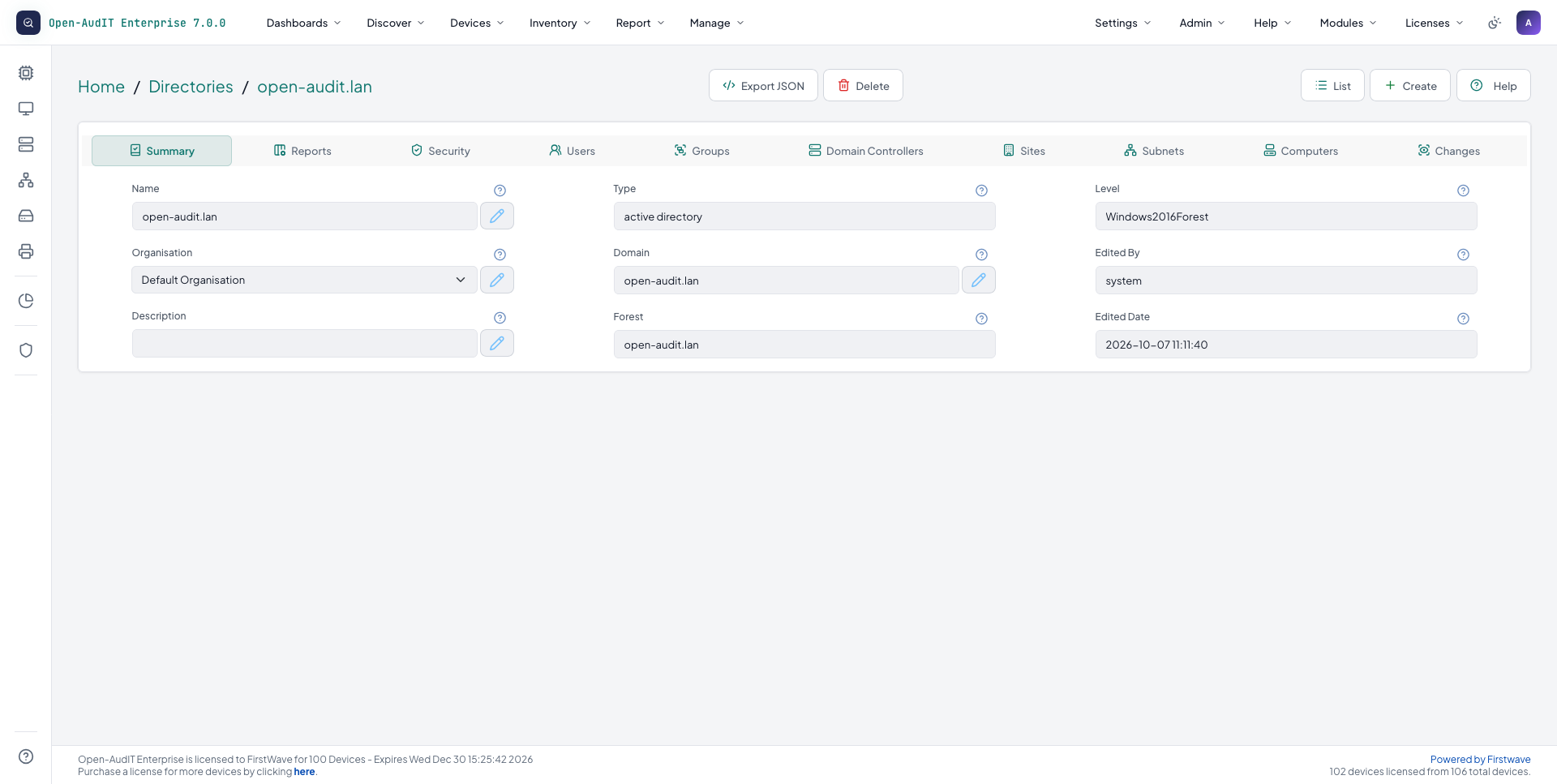
Users, groups, computers, domain controllers, sites and subnets on one screen, with change history.
Point Open-AudIT at Active Directory and it reads users, groups, computers, domain controllers, sites and subnets, then keeps a history as they change. Entra is supported as well.
The summary tracks accounts not logged on for more than thirty days, passwords set never to expire, group membership changes in the last seven days, and who is in Administrators, Domain Admins and Enterprise Admins.
Open-AudIT 7.0.1·Directories
An Active Directory domain's summary, with tabs for its users, groups, domain controllers, sites, subnets, computers and changes.
Then prove it's configured the way it should be
Enterprise
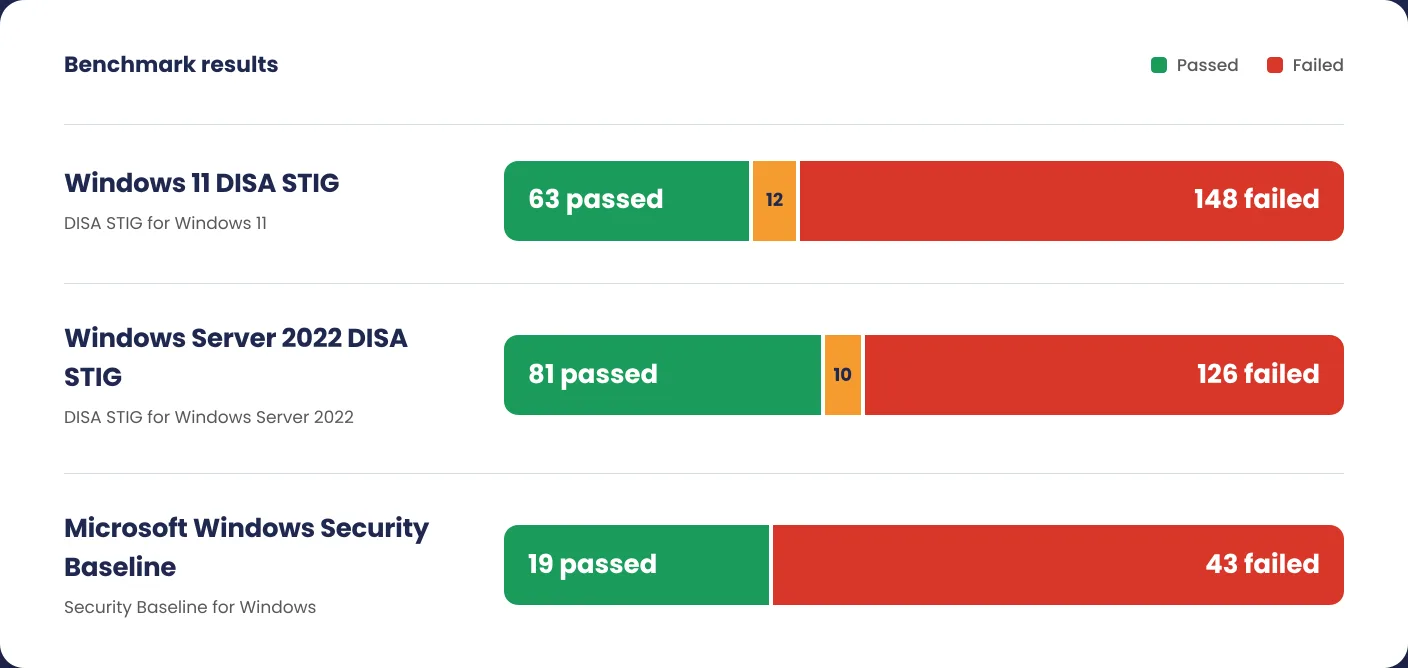
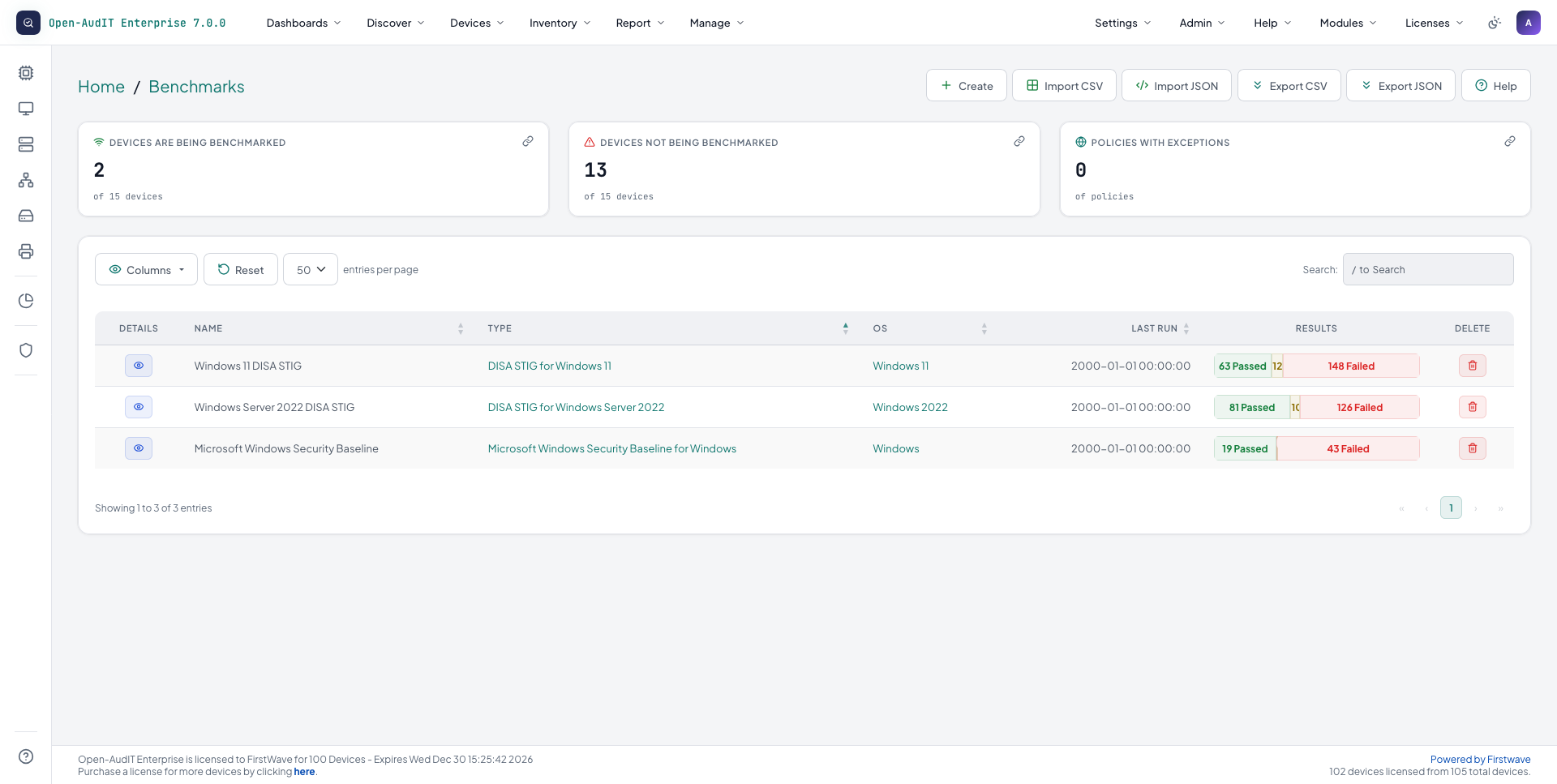
Discovery tells you what is on the network. Benchmarks tell you whether each machine is configured to a published standard, graded by severity and marked pass or fail, with the evidence kept.
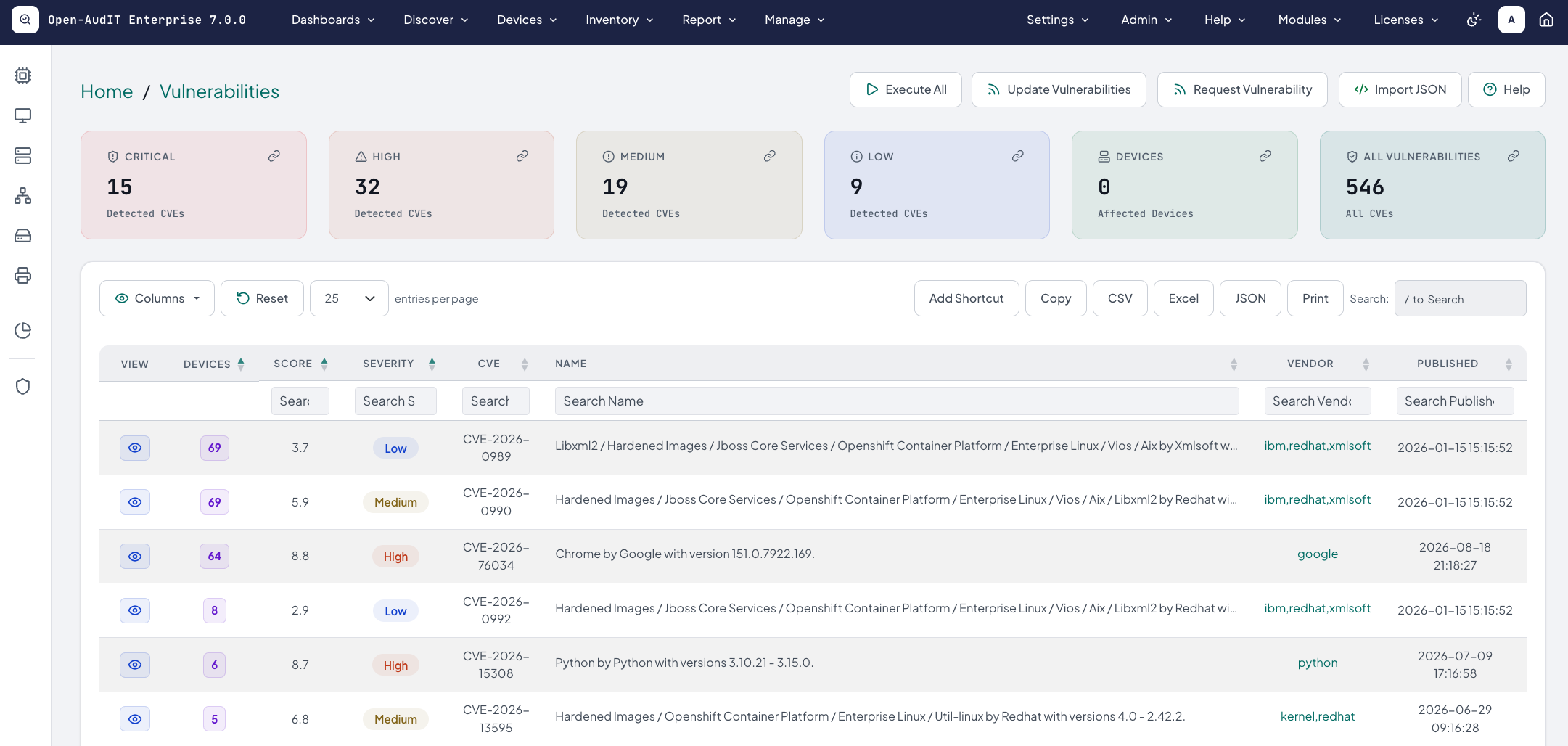
Vulnerability detection, on Professional and Enterprise, carries forward from Version 6. It uses AI to match CVEs to the devices you have discovered and alert you to the ones that affect you.
Linux servers
Profiles include CIS Benchmarks, DISA STIG, NIST 800-171, ACSC Essential Eight, ACSC ISM, HIPAA, PCI-DSS v4.0 and ANSSI, run over SSH with working SSH credentials.
Supported systems are Red Hat Enterprise Linux 7, 8 and 9, CentOS 7, Debian 12, SLES 15 and Ubuntu 20.04 and 22.04. The profiles available vary by distribution.
Windows
DISA STIG checks run as part of a normal audit, with nothing extra to configure.
Standards reporting
Track your performance against ISO 27001, CBDDO, BDDK, NCA ECC and ASD Essentials, 1,304 controls in all.
Open-AudIT 7.0.1·Benchmarks
Windows 11 and Windows Server 2022 DISA STIG benchmarks and the Microsoft Windows Security Baseline, with passed and failed checks for each.
Domains, vendors and certificates, kept in one place
DomainsEnterprise
Each domain records who it is registered through, the certificate securing it, when it expires and when renewal work should start, with a status of Active, Due For Renewal or Expired.
VendorsEnterprise
Vendors used to be a list of software vendors for filtering vulnerability retrieval. It is now a register of contact, legal and payment details, linked to the things each vendor supplies, and domains link to their registrar.
Certificates matched to web serversEnterprise
Certificates record issuer and fingerprint. Open-AudIT matches them to the web servers using them, by serial from the device audit, and marks a certificate active while any device still uses it.
What you'll use it for every day
Discovery finds the devices. These keep the inventory useful after that, each marked with the edition that includes it.
Inventory
Software and licencesEvery edition
See what software is deployed and how many licences you hold.
Device managementEvery edition
Record who has each device, where it is and its warranty.
Change and drift
Change detectionEvery edition
Every change to a device's attributes is recorded and reported.
Every edition discovers and audits over the network. Enterprise adds agents that audit Windows machines on a schedule without remote access.
Role-based accessEnterprise
Create roles to suit your requirements, including through Active Directory and LDAP.
Start free, grow into the edition you need
Credential-free discovery is in every edition, including Free on up to 100 devices. Professional adds automation, vulnerability detection and commercial support. Enterprise adds mapping, directories and benchmarking.
Which edition fits?
Enter how many devices you expect discovery to find, tick what you need, and the matching edition is marked below.
Free
$0
After your 30-day Enterprise trial, keep going free on up to 100 devices.
Enterprise · free for your first 30 days. No device cap. When the 30 days end, buy a licence, ask us for an extension or move to Free. Activation asks for your email address. Privacy policy
Up to 100 devices
Credential-free discovery engine
OT, IoT and service processor identification
353 device types
Credentialed audits over SNMP, WMI and SSH
Hardware and software inventory with change detection
Los productos Free, Professional y Enterprise comparten una base de código común; sin embargo, Open-AudIT Professional y Enterprise incluyen módulos adicionales que mejoran el descubrimiento, simplifican la administración y aumentan la capacidad de generación de informes. Utilice la tabla comparativa a continuación para decidir qué versión se adapta mejor a los requisitos de su organización.
Solo lectura significa que la edición puede usar los elementos incluidos con Open-AudIT, pero no puede modificarlos ni crear los suyos.
Funcionalidad
Free
Professional
Enterprise
Atributos. Defina las opciones de las listas desplegables, como el tipo de dispositivo, el estado y el entorno.
Incluido
Incluido
Incluido
Autenticación (OpenLDAP, Entra y Okta). Los usuarios inician sesión con sus cuentas de OpenLDAP, Active Directory, Entra u Okta.
Incluido
Incluido
Incluido
Componentes (descubrimiento de bases de datos, servidores web y recursos compartidos de archivos). Encuentre servidores de bases de datos, servidores web y recursos compartidos de archivos, y registre la configuración de cada uno.
Incluido
Incluido
Incluido
Conexiones. Registre los enlaces entre sus sitios, con proveedor, velocidad y costo.
Incluido
Incluido
Incluido
Credenciales. Guarde las credenciales que usan las auditorías para recopilar software, usuarios, números de serie y discos.
Incluido
Incluido
Incluido
Dispositivos. Un registro de cada dispositivo de su red, con más de cien atributos cada uno.
Incluido
Incluido
Incluido
Descubrimientos. Guarde una red y cómo escanearla, y descubra lo que contiene con un solo clic.
Incluido
Incluido
Incluido
Campos. Agregue sus propios campos de dispositivo, como una etiqueta de activo, el vencimiento de la garantía o el centro de costos.
Incluido
Incluido
Incluido
Grupos. Una condición guardada que siempre lista los dispositivos que la cumplen, como todos los servidores Windows.
Incluido
Incluido
Incluido
JSON API. Acceda a todos los objetos y acciones de forma programática a través de una API RESTful JSON completa.
Incluido
Incluido
Incluido
Licencias. Indique a Open-AudIT lo que compró y contará las instalaciones frente a ello.
Incluido
Incluido
Incluido
Ubicaciones. Asigne dispositivos a sitios físicos, desde la oficina central hasta el centro de datos.
Incluido
Incluido
Incluido
Redes. Sus subredes, mantenidas al día por el descubrimiento, con las direcciones usadas y disponibles.
Incluido
Incluido
Incluido
Noticias. Reciba fuentes de información seleccionadas sobre actualizaciones, avisos e información relevante del producto para su entorno de TI.
Incluido
Incluido
Incluido
Organizaciones. Cada elemento pertenece a una organización, y los usuarios solo ven las organizaciones que se les asignan.
Incluido
Incluido
Incluido
Consultas. Informes guardados que puede volver a ejecutar, con un amplio conjunto incluido.
Incluido
Incluido
Incluido
Usuarios. Cuentas con roles que definen lo que pueden hacer y organizaciones que definen sobre qué elementos.
Incluido
Incluido
Incluido
Resúmenes. Informes que cuentan dispositivos por tipo, sistema operativo o ubicación, con cada línea vinculada a los dispositivos.
Solo lectura
Incluido
Incluido
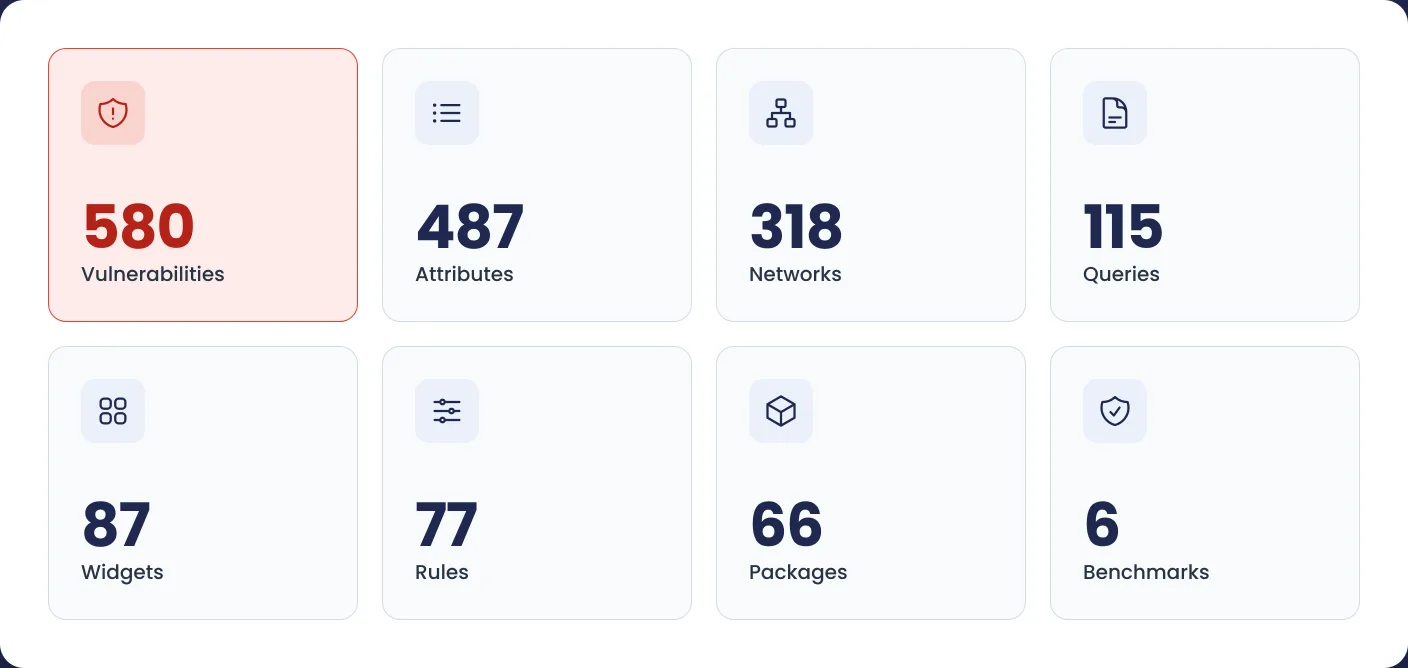
Widgets. Los gráficos y contadores con los que se construyen los paneles. Open-AudIT incluye 87.
Solo lectura
Incluido
Incluido
Clústeres. Registre dispositivos que solo tienen sentido juntos, como los nodos de una base de datos o un par de firewalls.
No incluido
Incluido
Incluido
Consultas comerciales
No incluido
Incluido
Incluido
Mapas. Las ubicaciones con coordenadas en un mapa mundial interactivo, con el número de dispositivos de cada una.
No incluido
Incluido
Incluido
Tareas (programación). Ejecute descubrimientos, consultas y auditorías de nube de forma programada.
No incluido
Incluido
Incluido
Vulnerabilidades. La IA relaciona los CVE con los dispositivos que ha descubierto y le alerta, con informes que muestran los dispositivos afectados y la severidad del riesgo.
No incluido
Incluido
Incluido
Agentes. Software para equipos Windows difíciles de auditar. Se reporta a diario y se audita a sí mismo.
No incluido
Solo lectura
Incluido
Aplicaciones. Modele cada aplicación como sus componentes descubiertos y las relaciones nombradas entre ellos.
No incluido
Solo lectura
Incluido
Paneles. Una cuadrícula de widgets que muestra el estado de su infraestructura de un vistazo.
No incluido
Solo lectura
Incluido
Opciones de escaneo de descubrimiento. Conjuntos con nombre de ajustes de escaneo, como qué puertos probar y cuánto esperar.
Solo lectura
Solo lectura
Incluido
Paquetes. Apruebe o prohíba paquetes de software y detecte el shadow IT.
Solo lectura
Solo lectura
Incluido
Personas. Las personas de su directorio, vinculadas a los dispositivos que utilizan.
Solo lectura
Solo lectura
Incluido
Roles. Permisos de creación, lectura, actualización y eliminación para cada parte de la aplicación.
Solo lectura
Solo lectura
Incluido
Reglas. Si pasa esto, haga aquello, para sus dispositivos. Cuando un dispositivo cumple la condición, se definen otros atributos.
Solo lectura
Solo lectura
Incluido
Líneas base. Defina configuraciones esperadas y compare dispositivos contra una línea base.
No incluido
No incluido
Incluido
Benchmarks. Compare los equipos con guías de bastionado publicadas, incluidos los DISA STIG y los CIS Benchmarks.
No incluido
No incluido
Incluido
Certificados. Monitoree certificados SSL/TLS y su vencimiento, con el emisor y la huella digital registrados y cada certificado vinculado a los servidores web que lo utilizan.
No incluido
No incluido
Incluido
Nubes. Descubra y audite instancias en AWS, Azure y Google Cloud.
No incluido
No incluido
Incluido
Recopiladores. Despliegue recopiladores ligeros para realizar descubrimientos seguros en redes remotas o segmentos aislados.
No incluido
No incluido
Incluido
Directorios. Usuarios, grupos, equipos, controladores de dominio, sitios y subredes en una sola pantalla, con historial de cambios.
No incluido
No incluido
Incluido
Dominios. Controle los nombres de dominio registrados, su registrador, certificado, vencimiento y renovación.
No incluido
No incluido
Incluido
Archivos. Vigile los archivos importantes, como sudoers o la configuración de SSH, y vea cuándo cambian.
No incluido
No incluido
Incluido
Integraciones. Comparta su lista de dispositivos con otros sistemas, como su plataforma de monitorización.
No incluido
No incluido
Incluido
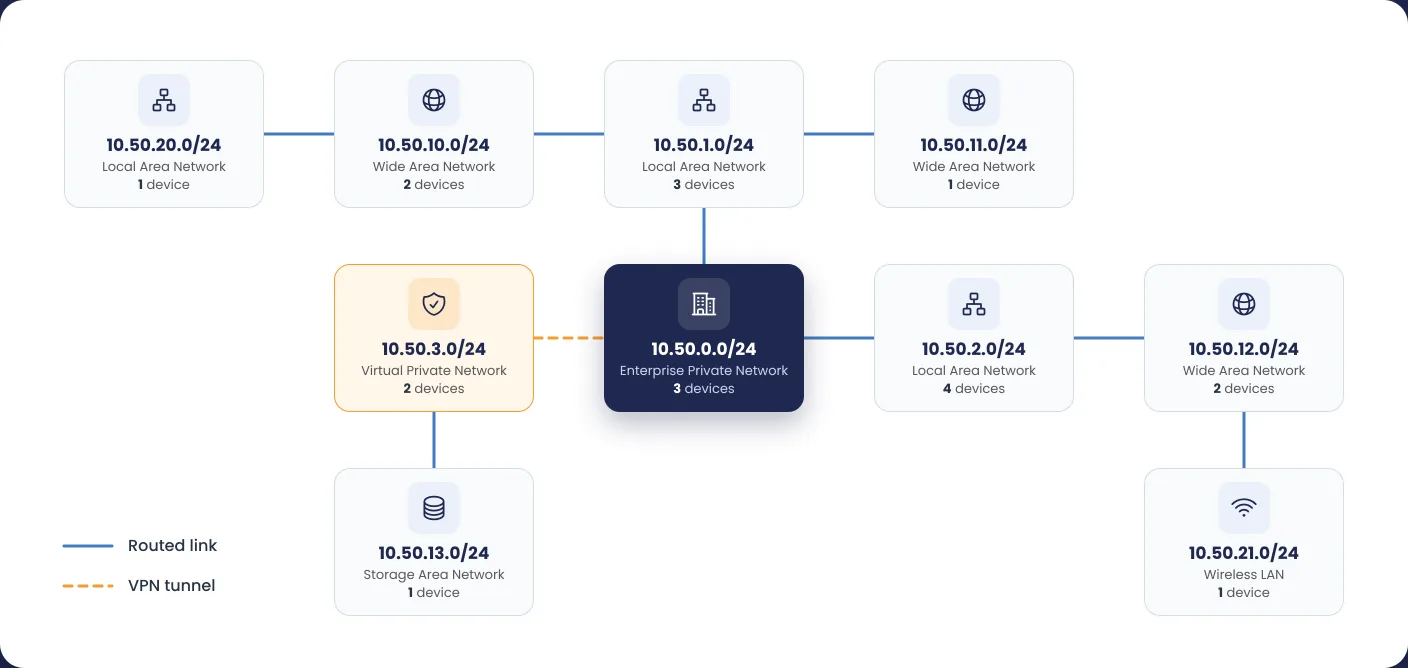
Network Mapping. Vea cada red dibujada del router al switch y a cada dispositivo, y cómo se conectan sus redes mediante enlaces enrutados y túneles VPN.
No incluido
No incluido
Incluido
Racks. Documente racks, posiciones de unidades de rack y ubicaciones de dispositivos, y genere informes a nivel de rack.
No incluido
No incluido
Incluido
Estándares. Genere informes alineados con los controles de ISO 27001, CBDDO, BDDK, NCA ECC y ASD Essentials para simplificar el seguimiento de cumplimiento y la preparación para auditorías.
No incluido
No incluido
Incluido
Proveedores. Un registro de las empresas a las que compra, con datos de contacto, legales y de pago, vinculado a lo que suministra cada una.
No incluido
No incluido
Incluido
Soporte comercial. Acceda a soporte del proveedor, base de conocimientos y servicios de mantenimiento.
No incluido
Incluido
Incluido
Dispositivos con licencia. Volumen de dispositivos licenciados incluido con cada edición.
Hasta 100 dispositivos
Desde 100 dispositivos
Desde 100 dispositivos
Atributos
Defina las opciones de las listas desplegables, como el tipo de dispositivo, el estado y el entorno.
FreeIncluido
ProfessionalIncluido
EnterpriseIncluido
Autenticación (OpenLDAP, Entra y Okta)
Los usuarios inician sesión con sus cuentas de OpenLDAP, Active Directory, Entra u Okta.
FreeIncluido
ProfessionalIncluido
EnterpriseIncluido
Componentes (descubrimiento de bases de datos, servidores web y recursos compartidos de archivos)
Encuentre servidores de bases de datos, servidores web y recursos compartidos de archivos, y registre la configuración de cada uno.
FreeIncluido
ProfessionalIncluido
EnterpriseIncluido
Conexiones
Registre los enlaces entre sus sitios, con proveedor, velocidad y costo.
FreeIncluido
ProfessionalIncluido
EnterpriseIncluido
Credenciales
Guarde las credenciales que usan las auditorías para recopilar software, usuarios, números de serie y discos.
FreeIncluido
ProfessionalIncluido
EnterpriseIncluido
Dispositivos
Un registro de cada dispositivo de su red, con más de cien atributos cada uno.
FreeIncluido
ProfessionalIncluido
EnterpriseIncluido
Descubrimientos
Guarde una red y cómo escanearla, y descubra lo que contiene con un solo clic.
FreeIncluido
ProfessionalIncluido
EnterpriseIncluido
Campos
Agregue sus propios campos de dispositivo, como una etiqueta de activo, el vencimiento de la garantía o el centro de costos.
FreeIncluido
ProfessionalIncluido
EnterpriseIncluido
Grupos
Una condición guardada que siempre lista los dispositivos que la cumplen, como todos los servidores Windows.
FreeIncluido
ProfessionalIncluido
EnterpriseIncluido
JSON API
Acceda a todos los objetos y acciones de forma programática a través de una API RESTful JSON completa.
FreeIncluido
ProfessionalIncluido
EnterpriseIncluido
Licencias
Indique a Open-AudIT lo que compró y contará las instalaciones frente a ello.
FreeIncluido
ProfessionalIncluido
EnterpriseIncluido
Ubicaciones
Asigne dispositivos a sitios físicos, desde la oficina central hasta el centro de datos.
FreeIncluido
ProfessionalIncluido
EnterpriseIncluido
Redes
Sus subredes, mantenidas al día por el descubrimiento, con las direcciones usadas y disponibles.
FreeIncluido
ProfessionalIncluido
EnterpriseIncluido
Noticias
Reciba fuentes de información seleccionadas sobre actualizaciones, avisos e información relevante del producto para su entorno de TI.
FreeIncluido
ProfessionalIncluido
EnterpriseIncluido
Organizaciones
Cada elemento pertenece a una organización, y los usuarios solo ven las organizaciones que se les asignan.
FreeIncluido
ProfessionalIncluido
EnterpriseIncluido
Consultas
Informes guardados que puede volver a ejecutar, con un amplio conjunto incluido.
FreeIncluido
ProfessionalIncluido
EnterpriseIncluido
Usuarios
Cuentas con roles que definen lo que pueden hacer y organizaciones que definen sobre qué elementos.
FreeIncluido
ProfessionalIncluido
EnterpriseIncluido
Resúmenes
Informes que cuentan dispositivos por tipo, sistema operativo o ubicación, con cada línea vinculada a los dispositivos.
FreeSolo lectura
ProfessionalIncluido
EnterpriseIncluido
Widgets
Los gráficos y contadores con los que se construyen los paneles. Open-AudIT incluye 87.
FreeSolo lectura
ProfessionalIncluido
EnterpriseIncluido
Clústeres
Registre dispositivos que solo tienen sentido juntos, como los nodos de una base de datos o un par de firewalls.
FreeNo incluido
ProfessionalIncluido
EnterpriseIncluido
Consultas comerciales
FreeNo incluido
ProfessionalIncluido
EnterpriseIncluido
Mapas
Las ubicaciones con coordenadas en un mapa mundial interactivo, con el número de dispositivos de cada una.
FreeNo incluido
ProfessionalIncluido
EnterpriseIncluido
Tareas (programación)
Ejecute descubrimientos, consultas y auditorías de nube de forma programada.
FreeNo incluido
ProfessionalIncluido
EnterpriseIncluido
Vulnerabilidades
La IA relaciona los CVE con los dispositivos que ha descubierto y le alerta, con informes que muestran los dispositivos afectados y la severidad del riesgo.
FreeNo incluido
ProfessionalIncluido
EnterpriseIncluido
Agentes
Software para equipos Windows difíciles de auditar. Se reporta a diario y se audita a sí mismo.
FreeNo incluido
ProfessionalSolo lectura
EnterpriseIncluido
Aplicaciones
Modele cada aplicación como sus componentes descubiertos y las relaciones nombradas entre ellos.
FreeNo incluido
ProfessionalSolo lectura
EnterpriseIncluido
Paneles
Una cuadrícula de widgets que muestra el estado de su infraestructura de un vistazo.
FreeNo incluido
ProfessionalSolo lectura
EnterpriseIncluido
Opciones de escaneo de descubrimiento
Conjuntos con nombre de ajustes de escaneo, como qué puertos probar y cuánto esperar.
FreeSolo lectura
ProfessionalSolo lectura
EnterpriseIncluido
Paquetes
Apruebe o prohíba paquetes de software y detecte el shadow IT.
FreeSolo lectura
ProfessionalSolo lectura
EnterpriseIncluido
Personas
Las personas de su directorio, vinculadas a los dispositivos que utilizan.
FreeSolo lectura
ProfessionalSolo lectura
EnterpriseIncluido
Roles
Permisos de creación, lectura, actualización y eliminación para cada parte de la aplicación.
FreeSolo lectura
ProfessionalSolo lectura
EnterpriseIncluido
Reglas
Si pasa esto, haga aquello, para sus dispositivos. Cuando un dispositivo cumple la condición, se definen otros atributos.
FreeSolo lectura
ProfessionalSolo lectura
EnterpriseIncluido
Líneas base
Defina configuraciones esperadas y compare dispositivos contra una línea base.
FreeNo incluido
ProfessionalNo incluido
EnterpriseIncluido
Benchmarks
Compare los equipos con guías de bastionado publicadas, incluidos los DISA STIG y los CIS Benchmarks.
FreeNo incluido
ProfessionalNo incluido
EnterpriseIncluido
Certificados
Monitoree certificados SSL/TLS y su vencimiento, con el emisor y la huella digital registrados y cada certificado vinculado a los servidores web que lo utilizan.
FreeNo incluido
ProfessionalNo incluido
EnterpriseIncluido
Nubes
Descubra y audite instancias en AWS, Azure y Google Cloud.
FreeNo incluido
ProfessionalNo incluido
EnterpriseIncluido
Recopiladores
Despliegue recopiladores ligeros para realizar descubrimientos seguros en redes remotas o segmentos aislados.
FreeNo incluido
ProfessionalNo incluido
EnterpriseIncluido
Directorios
Usuarios, grupos, equipos, controladores de dominio, sitios y subredes en una sola pantalla, con historial de cambios.
FreeNo incluido
ProfessionalNo incluido
EnterpriseIncluido
Dominios
Controle los nombres de dominio registrados, su registrador, certificado, vencimiento y renovación.
FreeNo incluido
ProfessionalNo incluido
EnterpriseIncluido
Archivos
Vigile los archivos importantes, como sudoers o la configuración de SSH, y vea cuándo cambian.
FreeNo incluido
ProfessionalNo incluido
EnterpriseIncluido
Integraciones
Comparta su lista de dispositivos con otros sistemas, como su plataforma de monitorización.
FreeNo incluido
ProfessionalNo incluido
EnterpriseIncluido
Network Mapping
Vea cada red dibujada del router al switch y a cada dispositivo, y cómo se conectan sus redes mediante enlaces enrutados y túneles VPN.
FreeNo incluido
ProfessionalNo incluido
EnterpriseIncluido
Racks
Documente racks, posiciones de unidades de rack y ubicaciones de dispositivos, y genere informes a nivel de rack.
FreeNo incluido
ProfessionalNo incluido
EnterpriseIncluido
Estándares
Genere informes alineados con los controles de ISO 27001, CBDDO, BDDK, NCA ECC y ASD Essentials para simplificar el seguimiento de cumplimiento y la preparación para auditorías.
FreeNo incluido
ProfessionalNo incluido
EnterpriseIncluido
Proveedores
Un registro de las empresas a las que compra, con datos de contacto, legales y de pago, vinculado a lo que suministra cada una.
FreeNo incluido
ProfessionalNo incluido
EnterpriseIncluido
Soporte comercial
Acceda a soporte del proveedor, base de conocimientos y servicios de mantenimiento.
FreeNo incluido
ProfessionalIncluido
EnterpriseIncluido
Dispositivos con licencia
Volumen de dispositivos licenciados incluido con cada edición.
Open-AudIT tells you what is on your network, how each device is configured and when that changes. It runs on a server you control, scans your networks for devices, audits what it finds and stores the results in a database you can query, report on and export. It needs no agent on the devices it audits, though Enterprise offers one for machines you cannot reach remotely.
What is new in Open-AudIT 7?
Version 7 is built around discovery. A new engine identifies devices without credentials, reading what each device's own protocol says back. That covers smart TVs, security cameras, PLCs, building controllers, NAS units and the management controllers inside servers. Enterprise also gains Network Dependency Mapping, the Network Routing Map, Application Relationship Mapping, a Directories view for Active Directory and Entra, Windows benchmarking against the DISA STIGs, and registers for Domains and Vendors. Every edition gets 353 device types (up from 98) and rewritten in-application documentation.
I am on version 6. Do I need to start again?
No. Open-AudIT 7 upgrades in place from any supported 6.x release, and everything customers rely on in version 6 carries forward. Upgrading also starts the 30-day Enterprise trial. Run the new installer, log in, and you will be taken to the database schema upgrade screen. Take a database backup first. The ip table is renamed to ip_address, but a view named ip is created so existing reports and integrations that read it keep working.
Discovery and credentials
Does Open-AudIT need credentials to discover devices?
Not to identify them. Open-AudIT 7 reads what each device's own protocol says back, and the parsed reply is kept in the discovery log as evidence. Add credentials and it discovers even more, running a full audit over SNMP, SSH, WinRM, WMI, or the APIs of ESXi, Proxmox, Nutanix and XCP-ng hosts.
What is the difference between discovery and an audit?
Discovery tells you what a device is. An audit reads what is on it. Open-AudIT first checks each target address for open ports, then runs a helper only where its port is open, so nothing is probed speculatively. If you hold working credentials for a computer, an audit script is copied to it and run, returning hardware, software and configuration detail. Switches, routers, printers and UPS units are queried over SNMP instead. Without credentials you still get a record of the device and whatever its open ports revealed.
What kinds of devices can it identify without a login?
The credential-free helpers cover PLCs over protocols such as S7, building management over BACnet and KNX, security cameras and recorders, including over ONVIF, server management controllers over Redfish, IPMI and Intel AMT, NAS units, printers, UPS, VoIP phones, smart TVs and media devices, game consoles, smart plugs and lights, access control terminals, fuel tank gauges, solar inverters, and specialist and unmanaged equipment. A device that answers nothing else usually presents a TLS certificate that names its vendor, and Open-AudIT reads that too.
What credentials do I need for a full audit?
Windows needs an account with administrator rights on the target, with a password set. On a domain, that is a member of the target's Administrators group. Off a domain, it is the built-in Administrator account, or another administrator with a registry change described in the documentation. Linux, Unix and macOS are audited over SSH and need root or sudo to retrieve every attribute. Network gear needs SNMP read access, and v1, v2c and v3 are all supported.
Does it need agents?
No. Every edition discovers and audits over the network. Enterprise adds optional agents, which are simple scripts that check in with the server each day and audit the machine locally, for Windows, macOS and Linux machines you would rather not open to remote access.
Can it discover a large or segmented network?
Yes. Version 7 splits large ranges into smaller subnets and scans them in parallel, reads the server's own ARP table, and queues every in-range address found in the tables of an audited switch, router or computer for its own scan. On Enterprise, Active Directory networks and locations can be used as discovery targets, and Collectors run on a remote subnet under the control of a central server, on Linux or Windows.
Installing and running it
What does it run on?
A 64-bit server, physical or virtual. Supported operating systems are Red Hat 9 and 10, Debian 12 and 13, Ubuntu 24.04, and Windows Server 2016 and later. Windows 10 and 11 are not supported as the server, because the desktop TCP/IP stack throttles the outbound connections discovery relies on. Open-AudIT is also included in the FirstWave VM if you would rather not install anything.
What hardware do I need?
For a responsive install the documentation recommends at least an Intel i7 class CPU, 16 GB of memory, 40 GB of disk and an SSD. It will install and run on anything that can run Apache and MySQL, just more slowly. Memory and fast disk make the biggest difference, because the database does most of the work. Vulnerability detection adds load, as it runs around 20,000 SQL statements at the end of each discovery.
How long does it take to get going?
Under ten minutes from download to first discovery, according to the install guides. The installer handles every dependency on Linux and Windows, so there is nothing to install first. On Windows, set the Apache service to run as a regular user account so it can reach network resources. Then log in, activate your licence, add credentials, add a discovery and run it.
Does Open-AudIT need internet access?
Only for two optional features. Vulnerability detection downloads CVE-derived definitions from FirstWave, and News delivers product updates and one-click configuration recommendations. Both send a small, documented set of non-sensitive data back (licence and application details, error logs, and counts of device types and features used, with no IP addresses, OS versions or software names). Both can be disabled, and the Help icon on the Vulnerabilities page shows exactly what is sent. Discovery and auditing run entirely inside your network.
Editions, licensing and support
What is the difference between Free, Professional and Enterprise?
Every edition includes discovery, credentialed auditing, change detection, software licence reporting, device management, custom fields, export to CSV, XML and JSON, and the JSON API. Professional adds scheduling of discoveries and reports, dashboards, vulnerability detection, reporting over a date range, geographical maps and commercial support. Enterprise adds network and application mapping, directories and people, benchmarking, standards reporting, baselines, file change detection, agents, collectors, cloud auditing, role-based access control, Entra and Okta sign-in, rules and custom dashboard widgets. Compare the editions on this page.
How does the licence work?
Every download of Open-AudIT 7 starts with a 30-day Enterprise licence covering unlimited devices, so you work with the full product from day one. Activation asks for your email address. When the trial ends you can buy a licence, ask FirstWave's sales team for an extension, or move to the Free edition, which covers up to 100 devices. Open-AudIT discovers over the network, so the device count is the number of devices in your inventory, not the number of users.
What support do I get?
Free users have the community documentation and forums. Professional and Enterprise include commercial support from the people who build the product. When you open a ticket, attach the Install Support file from the Support page in the application, plus the Discovery Support export if the issue is with discovery. Those two files let support see how your server is running without a round of back-and-forth questions.
How do I log in for the first time?
Browse to http://<your server>/open-audit/index.php/ (on Windows there are also Start Menu entries). A default administrator account is created at install, and its credentials are listed on the Open-AudIT FAQ page in the documentation. Change that password straight after your first login, then add your own users under Manage, Users.
Compliance, data and integrations
What does Open-AudIT benchmark against?
Benchmarking checks whether a machine is configured to a published standard, graded by severity and marked pass or fail. On Enterprise, Linux servers are checked over SSH using OpenSCAP profiles, and Windows machines get DISA STIG results as part of a normal audit with nothing extra to configure. Windows coverage is Windows 10 and 11, Windows Server 2019, 2022 and 2025, and the Microsoft Windows Security Baseline. Active Directory is also benchmarked against the DISA STIGs, in the Security view on the directory's page.
Can it help with ISO 27001 or other regulatory standards?
Yes, on Enterprise. Standards reporting records your answer and evidence against each control and reports completion, with an Excel export for auditors. ISO 27001 ships with 93 controls. Version 7 adds four more control sets, loaded and ready: CBDDO (660 controls) and BDDK (319) for Türkiye, NCA ECC (174) for Saudi Arabia, and ASD Essentials for Australia. Together the five standards provide 1,304 controls.
Can I get my data out, or feed another system?
Yes. Every list exports to CSV, XML or JSON, and the database structure is open and documented. A RESTful JSON API supports create, read, update and delete on every collection, including the six new ones in version 7 (directories, groups, directory security, directory changes, domains and people), which is how customers feed a CMDB. On Linux, Enterprise can also log new devices, component changes and vulnerabilities to syslog in Common Event Format for tools such as Splunk.
Is Open-AudIT an alternative to NetBox?
They serve different primary jobs. Open-AudIT is a discovery-first inventory and audit tool with built-in network scanning, change tracking, benchmarking and vulnerability detection. NetBox is an IPAM and DCIM documentation platform. Many organisations run both.
Does Open-AudIT do IPAM?
Open-AudIT records every IP address it discovers and, in version 7, draws each network with its DHCP, DNS, gateway and IP counts alongside. For dedicated IP address management, FirstWave offers opAddress, an IPAM module integrated with NMIS.
Which languages does the interface support?
Forty-two, including English, Spanish, Portuguese, German, French, Japanese, Chinese and Arabic. Translations are machine-generated, and FirstWave corrects any you report.
Find out what answers on your network.
Download the FirstWave VM and start a discovery. No credit card required.
Enterprise · free for your first 30 days. No device cap. When the 30 days end, buy a licence, ask us for an extension or move to Free. Activation asks for your email address. Privacy policy