Knowing What's on Your Network
The Problem with Manual Inventory
The standards for many organizations are still in the proverbial "dark ages" when it comes to keeping track of what is on their network. As a support engineer with Opmantek, I speak with multiple engineers every day. It isn't unusual for me to hear that engineers at large, Fortune 500 companies are still using text documents, spreadsheets, and even sticky notes to manage their device inventories. The challenge with this is in how long the manual process takes. Manually updating records often leads to maintaining inventory records inconsistently, causing the information to be incorrect and outdated.
How Open-AudIT Automates Discovery
Opmantek's Open-AudIT software delivers IT auditing and inventory management automation, as well as many other useful features. Keeping track of your organization's computers, printers, telephones, or any other network device is made easy with Open-AudIT. There are many ways to get information into Open-AudIT. One way is to simply enter your network's subnet(s) and valid credentials and watch Open-AudIT start to populate with your network information.
With this information you can keep track of and report on what software the devices have installed, warranty information, software licenses, hardware information, configuration changes, and much more. Open-AudIT monitors any changes made to your network, software updates, devices removed or added, and so on. This is accomplished by running scheduled scans of your network daily, weekly, or at any other interval you designate, then comparing the audit results over time to previous scan results.
Custom Fields and Queries
Customizable fields and queries allow you to keep track of any other information you feel is relevant to your organization. Open-AudIT comes preloaded with many queries out of the box. Device types, installed software, and hardware changes are a few of these. If a query is needed that is not pre-packaged, Open-AudIT allows you to create and customize queries to address any of your specific needs.
Quickly migrating from your current manual inventory and device management process is designed to be as automated as possible. Open-AudIT can import inventory information from various formats including XML, CSV, and others. For those still managing your inventory with spreadsheets and other files, this feature allows for the seamless implementation of your inventory records into Open-AudIT.
Available Editions
This software offers many more features than just what was discussed here, and did I mention you can even use the Community edition of Open-AudIT for free to get a feel for how it works? The Community edition gives you Network Discovery, Device and Software Auditing (including Device Port and Storage Appliances), Configuration Changes Detection and Reporting, Hardware Warranty Status, Inventory Management, and Custom Fields.
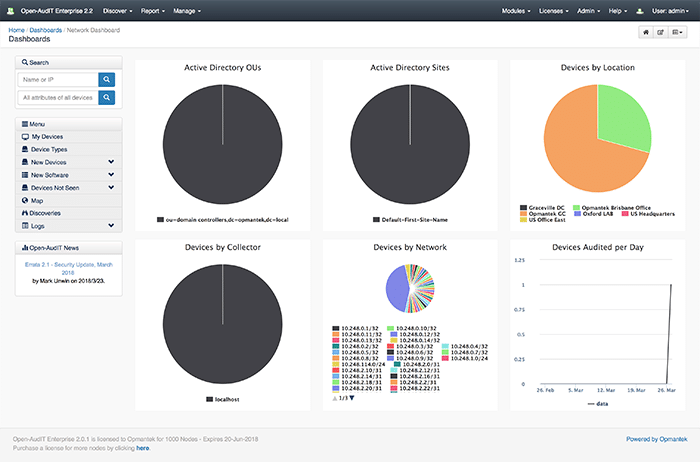
If you want to keep your network monitoring and inventory management system up to date along with having other useful features, you can upgrade from the Community edition to the Professional or Enterprise editions. With the Professional and Enterprise editions, you get Interactive Dashboards, Geographical Maps, Scheduling of Discoveries and Reports, and Enhanced Reports. These editions also come with commercial support to provide you with any assistance you may need in implementing and customizing Open-AudIT to your specific needs.
The Enterprise version is highly scalable for large organizations and includes additional features that improve and simplify administration. Enterprise also includes File Auditing, Baselines, and Configurable Role Based Access Control including Active Directory and LDAP support. More information on the different versions of Open-AudIT can be found on the Opmantek website.
Having all of your device and inventory information in one place while replacing most of the manual process behind maintaining that information can save countless hours. Custom fields and queries allow you to be in control of what information you want to collect, report on, and view. Configuration changes let you know when a device has been removed or added. I don't believe sticky notes or spreadsheets can do that. Make the switch to Open-AudIT and see how easy it is to know what is on your network.
Related reading:

Escrito por
Head of Marketing
Can't see the woods amongst the trees without Open-AudIT
Related datasheets
Take the details with you in a printable one-pager.