File and Folder Audit and Automation
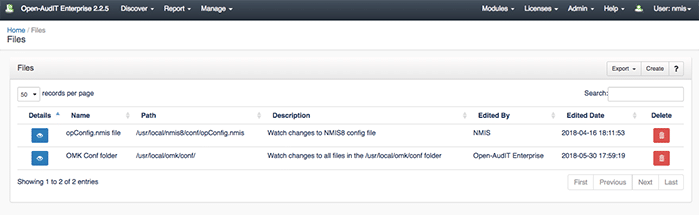
In previous posts (here first and secondly here) I have talked about how easy it is to use Open-AudIT to discover devices and set up scheduled reporting. This post will look at how powerful Open-AudIT is and how it can save companies from incredible regulatory audit nightmares. One of the key proponents of regulatory audits is ensuring that business processes are adhered to and a log of changes is available. Proactive businesses will use these strict standards to outline their personal business processes. One way this is achieved is by automating file and folder audits and scheduling reports with the changes. Having this information readily available will help most businesses come audit season while ensuring they have a complete grasp on what is occurring on their network.
Setting Up File and Folder Auditing
Let's look into how easy this would be to set up.
First off, it doesn't matter which operating system you are using for your server, Linux or Windows -- this feature is available on both. However, one minor change is required for Windows users (see the Open-AudIT documentation for details). This feature is also only available for Open-AudIT Enterprise users; you will have to contact us for a demo or enterprise trial license, as our regular trial users only get access to Professional.
Adding Files to Audit
Now you have Open-AudIT up and running, let's run through the process of setting up a file or folder to be audited, and then we will schedule a report to be generated. Navigate to "Discover", then "Files" (see the Files documentation for details), and finally "List Files" -- this will show you the list of files that will be audited by Open-AudIT, not a list of files in total.
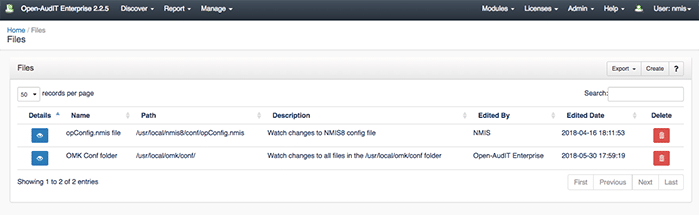
As you can see in the above example, it is quite a straightforward addition. You only need to edit four fields: Name, Organisation, Description, and Path. Once these have been edited, we can now run a query to populate the File table. There will already be a preconfigured "files" Query if you want to test the standard -- navigate to queries and run the files query.
Automating Reports

However, the point of this post is to automate as much as possible and remove stress and headaches.
To set up a report that lands in your inbox around your second coffee, head to "Admin", then "Tasks", and finally "Create Tasks". Here we can create a task with the type "Query" and called "Files" (unless we created a custom query). Make the time 10:30 am and set it to run daily, or whenever is convenient, and you will receive an email with the daily changes to the files or folders you are watching.
Wrapping Up
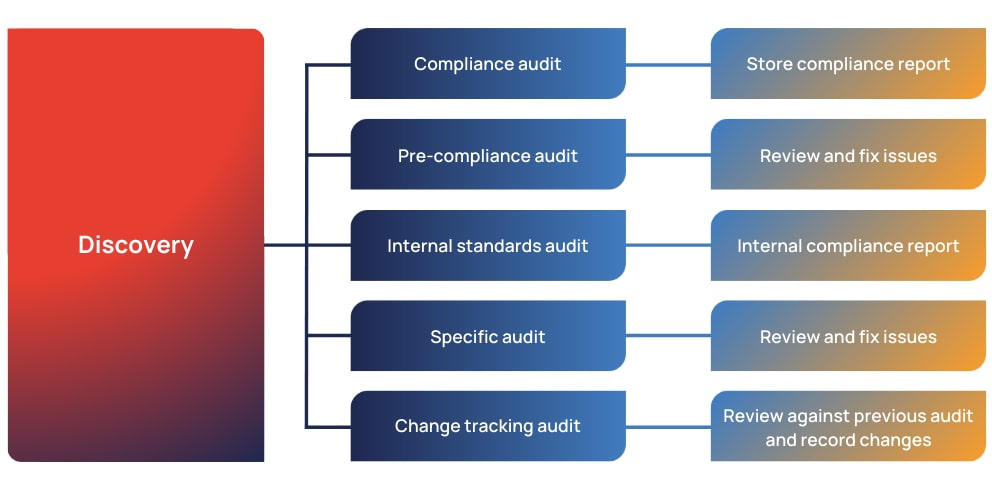
This form of change management will help you if serious questions occur during audit season, as well as make sure that your system is secure and configured how you want it. This demonstration is for one of the fantastic features inside Open-AudIT -- there is more that is available too. Open-AudIT has a 20-device trial license for you to test out the features. If you would like a larger trial license (which you will need for this example), don't hesitate to contact us or even request a demo -- we can help you get more wins every day.
Related reading: Automated Configuration Change Detection

Written by
Head of Marketing
Can't see the woods amongst the trees without Open-AudIT
Related datasheets
Take the details with you in a printable one-pager.